
Worker process failure diagnostics is a diagnostic feature that helps determine the cause of worker process failures OTHER THAN crashes.
These failures include:
- Failure to start within the configured startup time limit. More info
- Failure to stop within the configured shutdown time limit. More info
These issues are rare. Worker process crashes are the most common cause of worker process failures. LeanSentry can diagnose crashes without enabling worker process failure diagnostics. For more information on diagnosing and fixing crashes, please see Debugging production crashes with LeanSentry Crash diagnostics.
Worker process failures due to startup and shutdown time limits
IIS has configured time limits that provide the maximum amount that the Windows Process Activation Service (WAS, WPAS) will wait for your worker process to start or stop (e.g. during a recycle):
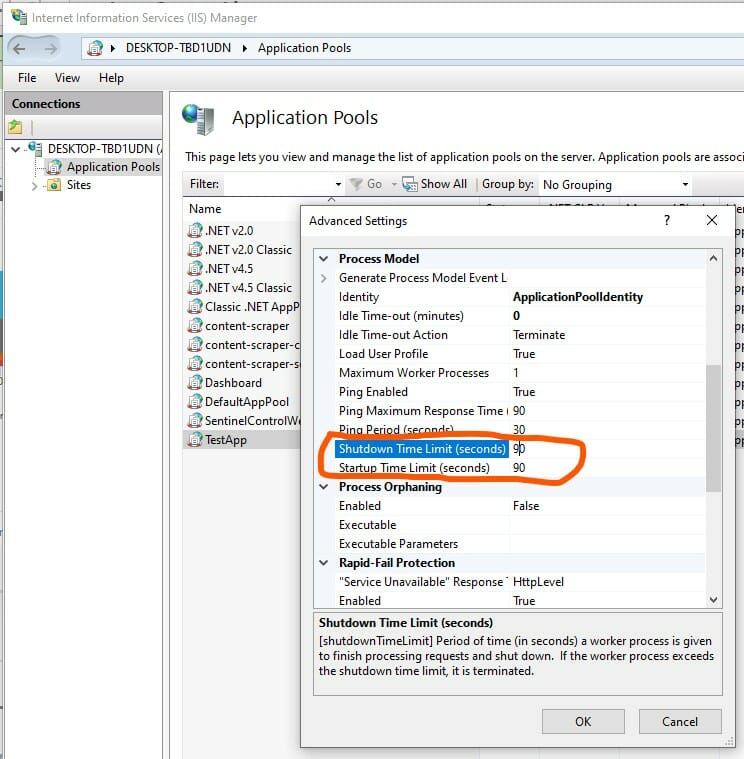
If your worker process fails to start or stop within this limit, this may signify application problems that prevent timely startup or shutdown.
If this happens, you may get the following errors in your event log or LeanSentry error tracking:
Log Name: System
Source: Microsoft-Windows-WAS
Date: 12/3/2020 01:24:12 AM
Event ID: 5013
Task Category: None
Level: Warning
Keywords: Classic User: N/A
Computer: ls-test4
Description: A process serving application pool 'TestApp' exceeded time limits during shut down. The process id was '1298'.
or
Description: A process serving application pool 'TestApp' exceeded time limits during start up. The process id was '2971'.
Diagnosing startup and shutdown worker process failures with LeanSentry
You can then enable Worker process failure diagnostics to allow LeanSentry to diagnose these failures by attaching a debugger to the worker process when it fails to start or stop on a timely basis.
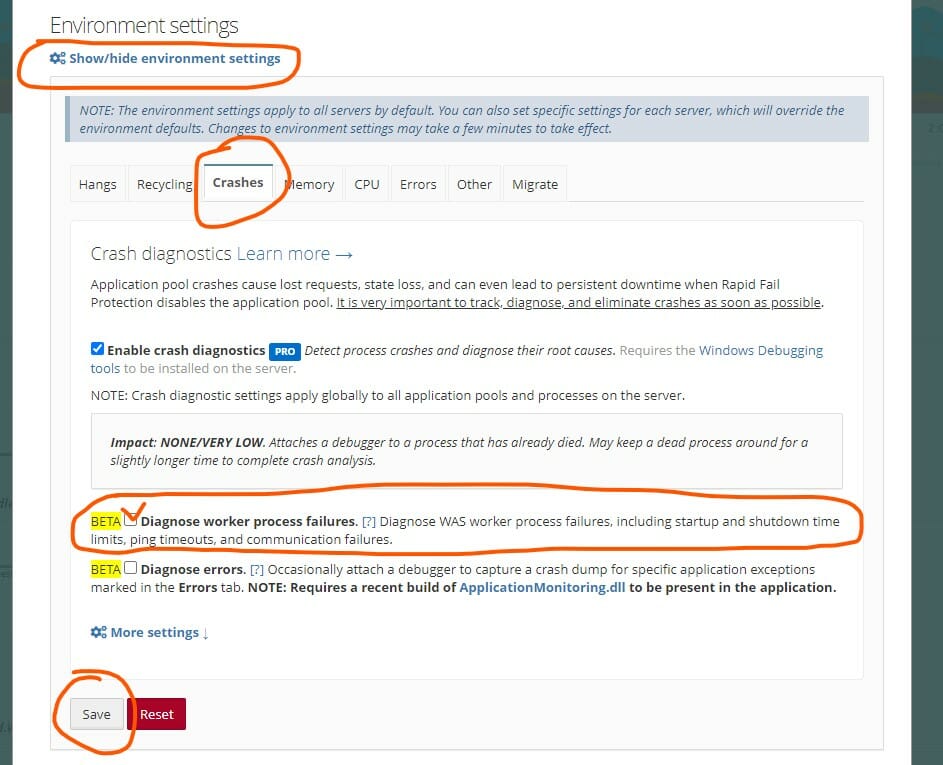
Check the "Diagnose worker process failures" checkbox and save the settings to enable this feature.
When you enable this feature, LeanSentry will enable process orphaning for your IIS application pools. This will WPAS to detach the IIS worker process that's failed due to a startup or shutdown time limit, and invoke the LeanSentry analysis program to determine what caused the process to become stuck.
The results will then become available as a crash diagnostic report in your dashboard.
Notes
-
This feature, like many other diagnostics LeanSentry performs, requires the Windows debugging tools to be installed on the server.
- LeanSentry will terminate the orphaned IIS worker process after 1 minute, to prevent worker processes from staying around.
Comments
0 comments
Please sign in to leave a comment.