
LeanSentry alerts automatically detect problems, and help you understand and troubleshoot them.
How are LeanSentry alerts different?
A common problem with IT alerts is that they are either too much or too little. If you get alerts about too many things, they become overwhelming and start getting ignored. If you dial down alerts, you can often miss important problems when they happen.
We worked hard on creating a better system for alerts in LeanSentry:
- No alert thresholds to set. LeanSentry automatically detects problems based on its expert rules.
- You get notified about important alerts only. Easily tell LeanSentry what's important to you, so you see more alerts for things you care about, and none for things you don't.
- Alerts give you the full picture, aggregating over all your servers, URLs, and time - instead of focusing on individual incidents.
- Alerts automatically detect root causes of problems. Your low memory problems at 4pm were caused by Admin Website, investigation complete.
What happens when an alert is generated?
When an alert is generated, LeanSentry makes it available in the dashboard.

You can immediately view the specific alert, as well as the category of similar alerts across all the objects (e.g. servers, URLs, etc) where they were generated.

In addition, we may send an alert notification email to users on the account, provided the alert was considered Important.

Watch level: when is an alert important?
Each alert is assigned a Watch level, which indicates how closely you are watching the alert:
- Ignore: You explicitly do not want to see this alert.
- Normal: This alert is not important enough to notify you.
- Important: This alert is important, and you will be notified about it.
- Watch: You are explicitly watching this alert, and will be frequently notified about it.
- The base watch level of the alert category. For example, High CPU alerts are considered "Normal" by default.
- The base watch level of the object. For example, all your servers start out as "Normal", but you may upgrade SRVWEB1 to be Important.

In addition, once an alert is raised, you can set the explicit watch level of the specific alert to an explicit level, overriding the default watch level. This allows you to create exceptions for specific alerts on specific objects:

Alerts automatically diagnose root causes of problems
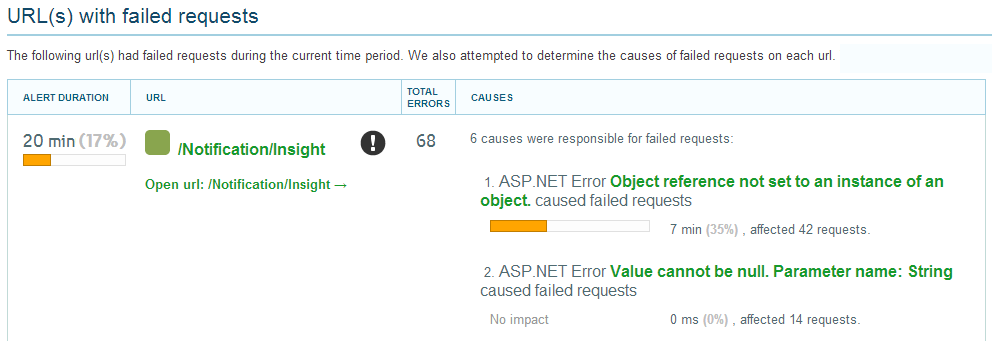
One of the big features of LeanSentry Alerts is that each alert attempts to automatically diagnose the root causes of the problem it identifies, allowing you to skip the complex root cause investigation and move straight to addressing the problem.
The root cause diagnosis is performed using all available data, and attempts to identify specific "causes" of the problem, and show their relative contribution over time. Not all alerts support root cause diagnosis, but we are adding more and more diagnoses as time goes on.
If you have any questions, please email us.
Comments
0 comments
Article is closed for comments.